
 Manuals, Guides, and Videos
 First Time Set Up
 Frequently Asked Questions
 Troubleshooting
Manuals, Guides, and Videos
|
Montrose Vinyl Record Player (RR35) |
|
|
Montrose Wireless Vinyl Record Player (RR36) |


First Time Set Up
-
Place the turntable on a sturdy and level surface.
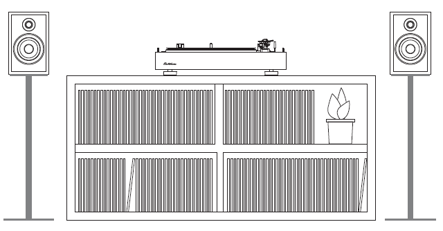
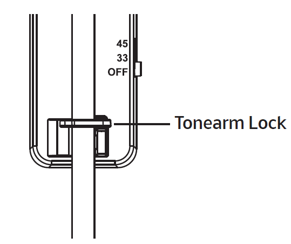
IMPORTANT: The turntable should not be placed on the same surface as speakers. - Open the lid and secure the tonearm using the tonearm lock.
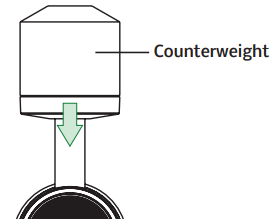
- Install the counterweight on the end of the tonearm with "0" at the top. Slowly push the counterweight onto the tonearm until it clicks twice.
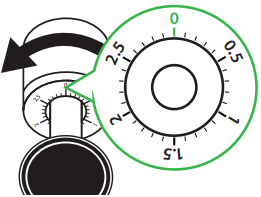
- Rotate the counterweight counterclockwise a full rotation so that 0 is aligned at the top. This will set the tracking force to 3 grams.
- Place the felt turntable mat over the spindle on top of the platter.
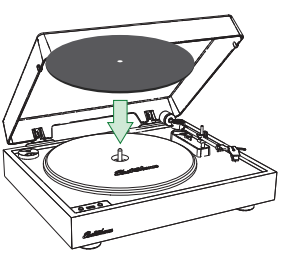
When to use the built-in preamp
This turntable includes a built-in preamp. To enable the internal preamp set the switch on the back of the unit to the ON position. If your speakers or amplifier have a Phono input, you will want to set the built-in preamp on the turntable to the OFF position as Phono inputs on amplifiers and speakers have their own preamp.
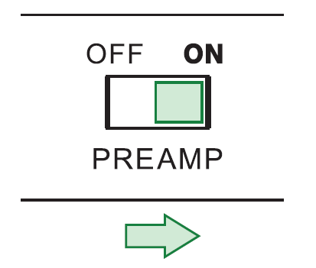
IMPORTANT: If you wish to use an external preamp (Example: Your Amplifier/Receiver has a PHONO input) you must disable the internal preamp by moving the switch to the OFF position.
Connect the RCA cables to the audio outputs on the back of the turntable and then plug the other end into your amplifier.
The included RCA cable has a ground cable attached.
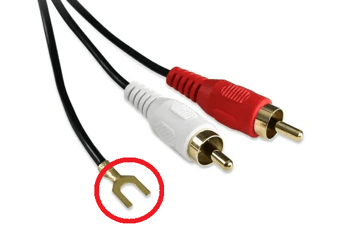
When using an external preamp, it is recommended to connect the ground wire to the ground terminal on the back of the turntable and also to the external preamp. If you hear a low frequency buzz from your speakers, grounding your turntable can often resolve it.
If a ground terminal is not available on your speakers/amplifier, you can slide the ground cable connector under a screw on the back of the speaker or on the body of your amplifier.
Ensure the power adapter is securely connected to a power outlet. Insert the power cable into the power input on the back of the turntable. Once connected, set the power switch to the ON position.
Does my turntable have built-in speakers?
No, you will need to connect your turntable to a set of speakers or an A/V receiver/amplifier, either using the RCA connection, or Bluetooth (RR36 only).
When do I use the Preamp?
If the speakers or receiver you connect the turntable to have a "Phono" input, you do not need to use the Electrohome internal preamp. you can set the preamp switch to off on the turntable. Leaving the preamp on in this setup would cause distortion.
Is it normal to hear popping and crackling while playing my records?
Depending on the condition of the record, this may be normal. We recommend using a carbon fiber anti-static brush to clean the records and a stylus brush to clean the needle.
-
Use a soft, dry microfiber cloth to wipe dust from the turntable surface.
-
Keep the dust cover closed to ensure the turntable components remain dust free.
How do I clean my stylus?
-
When the turntable is not in use always use the provided stylus protector to prevent accidental damage.
-
A stylus cleaning brush can be used to remove dust and debris from the stylus
How do I clean my records?
-
Records should be stored vertically in a dry environment away from sources of heat.
-
An anti-static brush can be used to remove dirt from the record’s grooved surface. Use a record cleaning solution to further clean your records to ensure crystal clear playback.
-
It is important to use the cueing lever when lifting or lowering the tonearm to prevent accidental slipping and scratching.
How do I replace my stylus?
The cartridge included on the turntable is the Audio Technica AT3600L. The replacement stylus for this model is the ATN3600L. To replace the stylus use the steps below.
-
Hold the cartridge in one hand, grasp the plastic stylus housing with your thumb and forefinger, and pull the stylus downward, away from the cartridge.
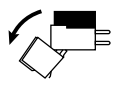
- The stylus will come away at a slight angle.
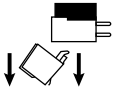
- Insert the new stylus assembly into the cartridge at a slight angle, so the hook at the end fits into the slot in the cartridge body.
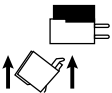
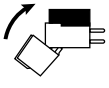
- Push the stylus towards the cartridge until the stylus clicks into place. Ensure the stylus is fully installed for proper operation.
Troubleshooting
No sound / Low volume- If the turntable is very quiet, or you can only hear the music coming from the record itself, the preamp switch may be in the wrong position.
- Set the preamp switch to ON and test playback again.
- Note: This turntable does not have built-in speakers. External speakers are required.
- Ensure the turntable is properly grounded.
- Connect the ground wire from the turntable to your amplifier or external preamp.
- If using an external preamp, it may be necessary to add a second ground wire from the preamp to the amplifier or powered speakers.
- Connect the turntable and other audio equipment directly to a wall outlet whenever possible.
- Avoid using power bars or extension cords, as they can introduce unwanted noise.
- Locate the speed selector switch on the side of the tonearm.
- The selector has three positions:
- 33 RPM
- 45 RPM
- OFF
- Verify that the correct speed is selected for the record you are playing.
- Adjust the selector switch to the appropriate speed and test playback again.
- Place the RR35/RR36 on a level, stable surface.
- Ensure records are clean and stored properly to prevent warping.
- Inspect the stylus and remove any dust or debris.
- Confirm the cueing lever is fully lowered.
- Press gently on the tonearm bridge to ensure the tonearm is completely lowered.
- Test with other records to determine if the issue is record-specific.
- Clean records thoroughly to remove dust and debris.
- Inspect records for scratches or signs of wear.
- Be aware that some popping or crackling may result from:
- Record damage
- Wear over time
- Inherent imperfections from the vinyl manufacturing process
- The Electrohome RR36 uses Bluetooth® Power Class 2 devices with a typical range of approximately 33 ft (10 m) line of sight.
- Ensure the Bluetooth speaker or device is within range.
- Move away from potential sources of wireless interference, such as:
- Wi-Fi routers
- Wireless peripherals
- Other Bluetooth devices
- Retry the pairing process after reducing potential interference.